For the first few months we tested Aiqaramba the way everyone tests a testing tool: by hand. Someone would deploy to staging, click around for ten minutes, and call it good. We sell a product whose whole point is that nobody should have to do that. It took us embarrassingly long to notice the contradiction.
When we did, the fix was obvious. Aiqaramba production is now a permanent QA client of Aiqaramba staging. Every feature we build gets tested by the product it is being built for. This post is about how that loop works, what the first campaign found, and what it taught us about our own product.
The setup
We run two environments: production at app.aiqaramba.com, serving real customers, and staging at stag.aiqaramba.com, where new code lands first. On production we created a project called "Aiqaramba Staging" and pointed it at the staging URL. When production launches agents for that project, those agents open real Chrome browsers on our Selenium Grid and navigate staging like any customer would.
Production is testing staging. The same product, testing itself across environments.
We also wanted the planning to be automated, so we made Claude Code the QA manager. It reads the campaign policies, launches agents, reads the results, fixes what it can, and re-runs. More on that below.
The five-layer pipeline
The campaign framework has five layers, each one independent of the app under test:
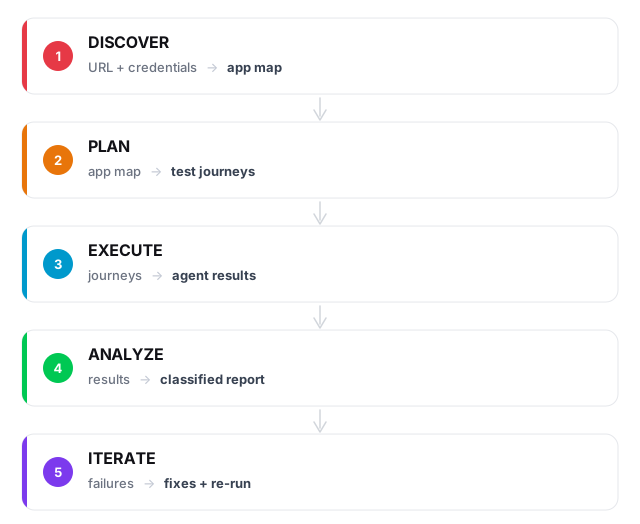
Give the system a URL and a set of credentials, and it crawls the app, maps every page and form, generates test journeys across several tiers, runs them through real browsers, classifies every failure, and feeds the lessons back into the next cycle.
None of this is specific to our app. The same framework works for any SaaS product we onboard. The only app-specific inputs are a URL and login credentials.
Tiered testing
Tests run in tiers, sequentially, with gates between them:
| Tier | What it tests | Pass gate |
|---|---|---|
| T0 | Can the agent log in? | 100%. If auth is broken, nothing else matters |
| T1 | Can the agent reach every page? | 90%. A few pages may sit behind feature flags |
| T2 | Can the agent fill out forms, create, edit and delete things? | 80%. Some CRUD operations are complex |
| T3 | Can the agent complete end-to-end workflows? | No gate. Failures are informative |
| T4 | What happens with empty forms, wrong passwords, XSS payloads? | No gate. Edge cases |
The gates are strict. If T0 fails, nothing else runs; there is no point testing form submissions when the agent cannot log in. This saves tokens, saves time, and surfaces the most important failures first.
The first campaign
On 10 March 2026 we ran the first full dogfood campaign. Production launched 19 agents against staging. Each agent had a different mission: log in, create a project, run a discovery, delete a persona, submit an empty form.
Seventeen of the nineteen passed on the first run. Between the two failures and the notes in the reports of the ones that passed, we ended up with six findings:
- 3 real bugs: sidebar links missing, a 500 error on a core endpoint, and a schema drift between staging and production
- 3 UI gaps: delete buttons used
window.confirm(), which the agents cannot interact with, and two pages lacked edit forms entirely
All three bugs were fixed in the same session, and the fixed tests re-run, before anyone went home.
The window.confirm() finding was the one that stuck with us. Selenium agents cannot see or click native browser dialogs. Neither can screen readers. We had built delete buttons that were invisible to both, and it took our own agents to tell us. We swapped them for in-page confirmation dialogs, and improved accessibility by accident.
Claude Code as QA manager
We do not just launch agents and read results. Claude Code, the same tool that helps us write code, runs the whole campaign.
- Claude reads the campaign policies: tier definitions, pass gates, failure classification rules, monitoring thresholds
- Claude launches agents through a runner script that handles API calls, polling and result collection
- While agents run, a health check watches for stuck agents. If an LLM stops responding mid-run, the stall is detected and the agent retried
- When agents finish, Claude classifies every failure into one of four buckets: app bug, prompt gap, infrastructure issue, or budget exhaustion
- Claude fixes what it can. If a journey failed because the prompt was vague, it rewrites the prompt. If the UI is actually broken, it fixes the code
- Claude re-runs the fixed tests and writes a campaign report
The classification step matters, because a failure does not always mean the app is broken:
prompt_gap:   Agent couldn't find the button  ->  refine the prompt
app_bug:      Page returned a 500 error       ->  fix the code
infra:        LLM hung for 10 minutes         ->  stop and retry
budget:       Agent ran out of iterations      ->  increase the limit
Knowing why something failed decides what happens next. A prompt gap gets a better prompt, an app bug gets a code fix, an infrastructure issue gets a retry.
The self-improvement loop
What happens between campaigns is where the value compounds. We built a reflection step: a structured pass in which the system reviews its own performance during idle periods.
Coverage gaps. Compare the discovery app map against the pages agents actually visited. If a page was never reached, generate a journey for it.
Failure patterns. If three different agents fail on the same page, that is one systemic issue rather than three independent failures.
Prompt effectiveness. Track success rate and iteration count per journey. A journey that consistently needs more than 60 iterations has a vague prompt. One that passes in 11 can have its budget tightened.
Regression detection. Compare campaign N against campaign N-1. A test that used to pass and now fails means something changed, and it gets flagged before a customer notices.
The reflection step produces concrete outputs: new journeys for the coverage gaps, refined prompts for the underperforming tests, and regression alerts. Each campaign feeds the next.
What happens when models get better
The first campaign ran on Gemini 3 Flash. It worked, with a hang rate around 30% and prompts that needed careful wording. When we switched to a newer model, agents completed the same tasks in fewer iterations with less hand-holding, and we had not changed a line of code.
That is the part of this we find most interesting. A Selenium script is exactly as capable on day 1000 as it was on day 1. An agent-based test gets more capable every time the underlying model does, and the coverage of every app we monitor improves with it.
The loop never stops
This is not a nightly batch job. The loop runs continuously.
On a daily and weekly cadence, the QA manager does the planning: reviewing coverage gaps, generating journeys for untested pages, adjusting the prompts that failed last time. Between planning cycles, regression tests run continuously. When something breaks, a ticket is created. When the fix lands on staging, agents re-test it. The cycle repeats until the dashboard is green.
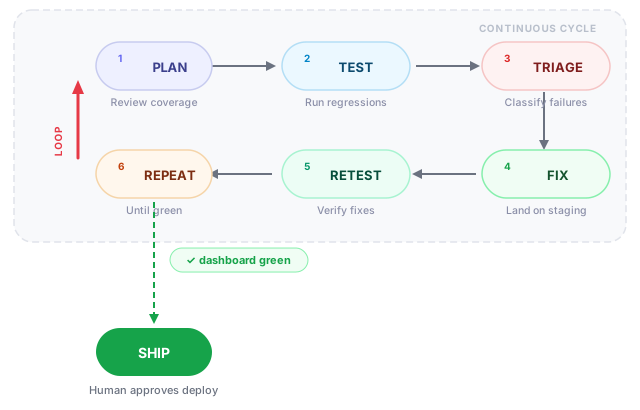
Only at the end does a person step in. When every journey passes, one of us reviews what changed and approves the production deploy. We would like to say we always did that carefully. Before the agents, "reviewing what changed" mostly meant trusting the person who wrote it.
The challenge
We believe there are no UI bugs in production that we have not already caught in staging. Every page, every form, every workflow has been navigated by an agent before it reaches a real user.
If you find one, we want to know. Go to app.aiqaramba.com, click around, and try to break something. If you find a UI bug our agents missed, mail us at sales@aiqaramba.com. We will add a test for it, and we will tell you how long it took before the agents caught it on their own in the next campaign.