We Use Our AI Testing Tool to Test Our AI Testing Tool
Aiqaramba is a platform that uses AI agents to test web applications. So when it came time to QA our own product, we had an obvious question: can we use Aiqaramba to test Aiqaramba?
The answer is yes. And it turned into something more interesting than a one-off experiment. Aiqaramba production is now a permanent QA client of Aiqaramba staging. Every feature we build gets tested by the product it's being built for. The product improves itself.
The problem with testing a testing tool
Most QA platforms have a dirty secret: they're tested the old-fashioned way. Manual clicking. Selenium scripts with brittle selectors. Maybe some unit tests that check the backend but never touch the actual UI.
We wanted something different. We wanted a system where an AI orchestrator (in our case, Claude Code running in a terminal) could act as a QA manager: planning test campaigns, launching AI agents, analyzing results, fixing issues, and re-running. A loop that gets smarter every cycle.
The setup is deliberate. We run two environments: production (app.aiqaramba.com) and staging (stag.aiqaramba.com). Production is the real system, serving real customers. Staging is where new code lands first. We created a project on production called "Aiqaramba Staging" and pointed it at the staging URL. When production launches agents for that project, those agents open real Chrome browsers and navigate staging like any user would. Production is testing staging. The same product, testing itself across environments.
The five-layer pipeline
We designed a campaign framework with five layers, each one independent and app-agnostic:
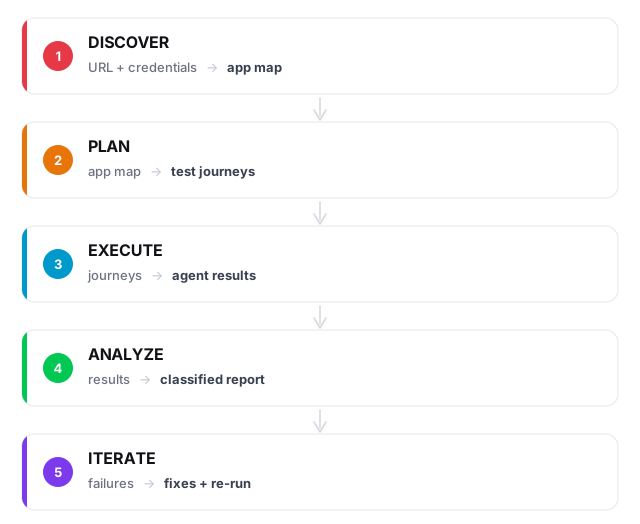
Give the system any URL and a set of credentials, and it can crawl the app, map out every page and form, generate test journeys across multiple tiers, run them through real browsers, classify every failure, and feed lessons back into the next cycle.
None of this is specific to our app. The same framework works for any SaaS product we onboard. The only app-specific inputs are a URL and login credentials.
Tiered testing: not all tests are equal
We organize tests into tiers that run sequentially, with gates between them:
| Tier | What it tests | Pass gate |
|---|---|---|
| T0 | Can the agent log in? | 100%. If auth is broken, nothing else matters |
| T1 | Can the agent reach every page? | 90%. A few pages may be behind feature flags |
| T2 | Can the agent fill out forms, create/edit/delete things? | 80%. Some CRUD ops are complex |
| T3 | Can the agent complete end-to-end workflows? | No gate. Failures are informative |
| T4 | What happens with empty forms, wrong passwords, XSS payloads? | No gate. Edge cases |
The gates are enforced strictly. If T0 fails, nothing else runs. No point testing form submissions if the agent can't even log in. This saves tokens, saves time, and surfaces the most important failures first.
The first campaign: 89% pass rate, 7 bugs found
On March 10, 2026, we ran our first full dogfood campaign. Production Aiqaramba launched 19 agents against staging. Each agent had a different mission: log in, create a project, run a discovery, delete a persona, submit an empty form. Real Chrome browsers on a Selenium Grid, navigating the staging UI exactly like a customer would.
- 3 real bugs found: sidebar links missing, a 500 error on a core endpoint, and a schema drift between staging and production
- 3 UI gaps identified: delete buttons used
window.confirm()which AI agents can't interact with, and two pages lacked edit forms entirely - All 3 bugs fixed within the same session
The most interesting finding: our delete buttons used the browser's native window.confirm() dialog. Selenium agents can't see or click native dialogs. Neither can screen readers. By catching this through AI testing, we accidentally improved accessibility too.
Claude Code as QA manager
We don't just launch agents and read results. Claude Code, the same AI that helps us write code, acts as the QA manager for the entire campaign.
The workflow:
- Claude reads the campaign policies: tier definitions, pass gates, failure classification rules, monitoring thresholds
- Claude launches agents via our
runner.shscript, which handles API calls, polling, and result collection - While agents run, a health check monitors for stuck agents. If an LLM stops responding mid-run, the system detects the stall and retries automatically
- When agents finish, Claude classifies every failure into one of four buckets: app bug, prompt gap, infrastructure issue, or budget exhaustion
- Claude fixes what it can. If a journey fails because the prompt was too vague, Claude rewrites it. If it fails because the UI is actually broken, Claude fixes the code
- Claude re-runs the fixed tests and writes a campaign report
The classification step matters. Not every failure means the app is broken:
prompt_gap:   Agent couldn't find the button  →  refine the prompt
app_bug:      Page returned a 500 error       →  fix the code
infra:        LLM hung for 10 minutes         →  stop and retry
budget:       Agent ran out of iterations      →  increase the limit
Knowing why something failed determines what happens next. A prompt gap gets a better prompt. An app bug gets a code fix. An infra issue gets a retry. This classification turns raw pass/fail data into actionable intelligence.
The self-improvement loop
What happens between campaigns is where the real value compounds. We built a reflection framework: a structured process where the system evaluates its own performance during idle periods.
Coverage gaps. Compare the discovery app map against the pages agents actually visited. If a page was never reached, generate a new journey for it.
Failure patterns. If three different agents all fail on the same page, that's a systemic issue, not three independent failures.
Prompt effectiveness. Track success rate and iteration count per journey. If a journey consistently takes 60+ iterations, the prompt is too vague. If it passes in 11 iterations, the budget can be tightened.
Regression detection. Compare campaign N against campaign N-1. If a previously-passing test now fails, something changed. Flag it as a regression before customers notice.
The reflection framework produces concrete outputs: new journeys to fill coverage gaps, refined prompts for underperforming tests, and regression alerts. Each campaign feeds the next one.
What happens when models get better
Our first campaign used Gemini 3 Flash. It worked, but with a 30% LLM hang rate and prompts that needed careful engineering. When we switched to a newer model, agents completed tasks in fewer iterations with less hand-holding.
Our test coverage improves every time the underlying model improves, without us changing a single line of code. Better models mean agents can handle more complex workflows, recover from unexpected UI states, and need less explicit instruction.
This is fundamentally different from traditional test automation, where your Selenium scripts are exactly as capable on day 1000 as they were on day 1. AI-powered testing rides the model improvement curve automatically.
Consider the trajectory:
- Today: AI agents can navigate forms, click buttons, fill inputs, and verify outcomes
- Soon: Agents will handle drag-and-drop, complex multi-step wizards, file uploads, and real-time collaboration
- Eventually: Agents will understand intent well enough that you can say "test the checkout flow" without specifying a single step
Each improvement in model capability translates directly into broader, deeper test coverage, across every app we monitor.
The loop never stops
This isn't a nightly batch job. The loop runs continuously.
On a daily and weekly cadence, the QA manager does strategic planning: reviewing coverage gaps, generating new journeys for untested pages, adjusting prompts based on what failed last time. Between planning cycles, regression tests run continuously. When something breaks, a ticket gets created. When the fix lands on staging, agents re-test it. The cycle repeats until the dashboard goes green.
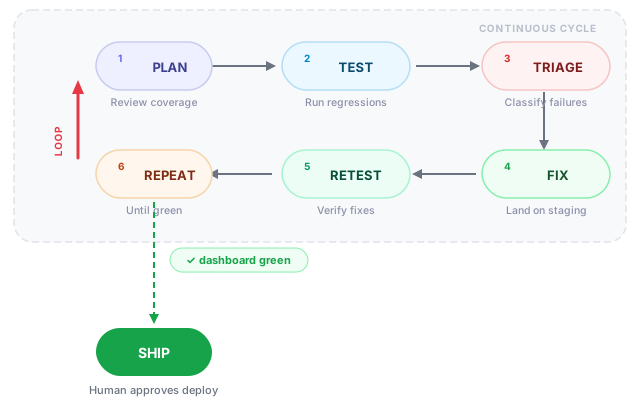
Only at the end does a human step in. When every journey passes and the dashboard is green, a human reviews what changed and approves the production deploy. The AI handles the volume. The human handles the judgment call.
No test scripts to maintain. No selectors to update. No flaky test infrastructure to debug. Just a continuous loop that grinds toward green, and a human gate before anything reaches users.
What this means for you
If you're building a SaaS product, your test suite probably doesn't test what your users actually do. Unit tests verify functions. Integration tests verify APIs. But nobody verifies that a real user can navigate your sidebar, fill out your forms, and complete your workflows. At least not continuously, at scale, across every deploy.
AI-powered testing changes the economics. Instead of writing and maintaining hundreds of brittle test scripts, you give an AI agent your URL and your credentials. It figures out the rest.
And when the models get better next quarter (and they will) your tests get better too. For free.
The challenge
We believe there are no UI bugs in production that we haven't already caught in staging. Every page, every form, every workflow has been navigated by an AI agent before it reaches a real user.
If you find one, we want to know. Go to app.aiqaramba.com, click around, and try to break something. If you find a UI bug that our agents missed, email me at alexander.rogiers@alex-ai.eu. We'll add a test for it, and we'll tell you how long it takes before our agents catch it on their own in the next campaign.
We're serious about this. If the system works, we should be able to back it up.
Want AI agents testing your app?
Book a 30-minute demo and we'll run agents on your critical flows.
Book a demo →